

Table Of Content
Introduction Step 1: Define Your Niche and Target Audience Step 2: Choose the Right eCommerce Platform Step 3: Pick and Register a Domain Name Step 4: Design Your Website Step 5: Add Your Products Step 6: Set Up Secure Payments Step 7: Configure Shipping and Tax Step 8: Optimize for SEO Step 9: Set Up Marketing and Analytics Step 10: Test and Launch! Step 11: Keep Improving (Post-Launch) Step 12: Build Trust with Your Customers Step 13: Create a Memorable Brand Identity Step 14: Ensure Legal and Compliance Essentials Are in Place Benefits of having an eCommerce Website Final Thoughts: Start Smart. Grow Bold. FAQs
Introduction
Ever thought about launching your own online store but felt overwhelmed by the tech and endless choices? You’re not alone. With global eCommerce sales expected to hit $7.4 trillion by 2026, there's never been a better time to dive in. The good news? You don’t need to be a coder or design expert to build a powerful, profitable eCommerce website. All you need is a clear step-by-step plan and that’s exactly what this guide will give you.

Source - grandviewresearch
Let’s break it down into simple, actionable steps. Whether you’re selling handmade candles or high-end electronics, this guide is your go-to blueprint for success.
Step 1: Define Your Niche and Target Audience
Before diving into the design or tech, start with strategy.
Ask Yourself:
- What product(s) will I sell?
- Who is my ideal customer?
- What problems does my product solve?
- Who else is selling this, and how can I be different?
Pro Tip: Use tools like Google Trends, Answer the Public, and Amazon Best Sellers to validate your niche. Doing this research now saves you from expensive problems later.
Step 2: Choose the Right eCommerce Platform
Bonus Step: Choose the Right Business Model
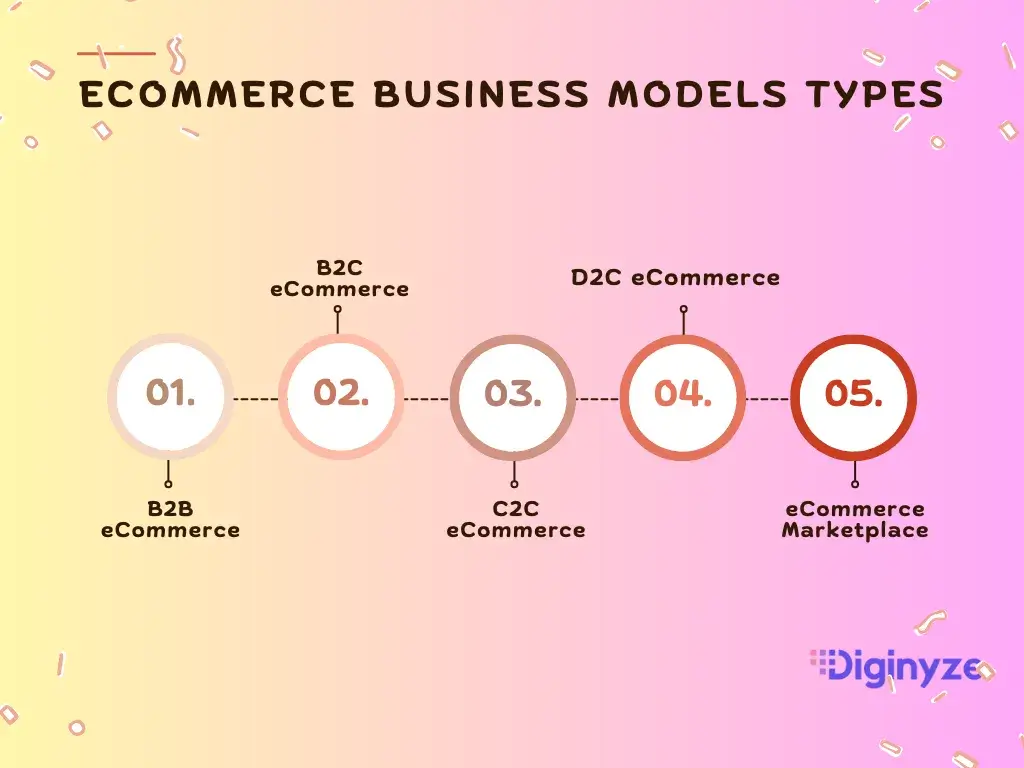
Before diving into design or product sourcing, it’s important to decide how you want to sell your business model shapes everything from website features to marketing tactics.
Here are a few popular options to consider:
- B2C (Business-to-Consumer): This is the most familiar model where businesses sell products directly to individual customers. Examples include online fashion retailers, electronics stores, and subscription boxes.
- B2B (Business-to-Business): In this model, businesses sell products in bulk to other businesses, wholesalers, or retailers. It often involves larger orders and customized pricing.
- Consumer-to-Consumer (C2C): Platforms like eBay and Etsy enable consumers to sell products directly to other consumers. This peer-to-peer selling is popular for handmade goods and secondhand items.
- DTC (Direct-to-Consumer): Eliminating traditional retail middlemen, brands sell their products directly to customers, fostering closer relationships and better margins.
- Marketplace Selling: Selling your products through established online marketplaces like Amazon, eBay, or Etsy gives you instant access to a large, ready-made audience.
Good news : Diginyze supports all major eCommerce business models, so you’re covered no matter how you want to operate.
Whatever your model, Diginyze adapts to your needs so you can focus more on growing your business and less on juggling multiple tools.
Also Look For:
- Mobile responsiveness
- Built-in SEO features
- Secure checkout options
- Easy inventory and order management
Step 3: Pick and Register a Domain Name
Your domain is your brand's online identity.
Tips for Choosing a Domain:
- Keep it short, simple, and memorable
- Avoid hyphens or numbers
- Use relevant keywords (if possible)
- Check domain name availability using popular domain registration services online.
Step 4: Design Your Website
You don’t need design skills to create a nice website. Most tools let you build it easily by dragging and dropping or using ready-made templates.
Focus On:
- Homepage: First impressions matter. Make it simple, interesting, and easy to move around.
- Product Pages : Include high-quality images, detailed descriptions, reviews, and pricing.
- Navigation :Clear menus and search functions.
- Mobile Optimization : Over 60% of online shopping is done on smartphones.
Step 5: Add Your Products
Product presentation can make or break a sale.
For Each Product:
- Use high-resolution images (multiple angles)
- Write clear, benefits-focused descriptions
- Include pricing, variants (size, color), and stock availability
- Add product reviews/testimonials for social proof
Bonus: Use AI-powered eCommerce platform like Diginyze to auto-generate product descriptions, optimize SEO, and personalize recommendations.
Step 6: Set Up Secure Payments
A seamless checkout experience builds trust and reduces cart abandonment.
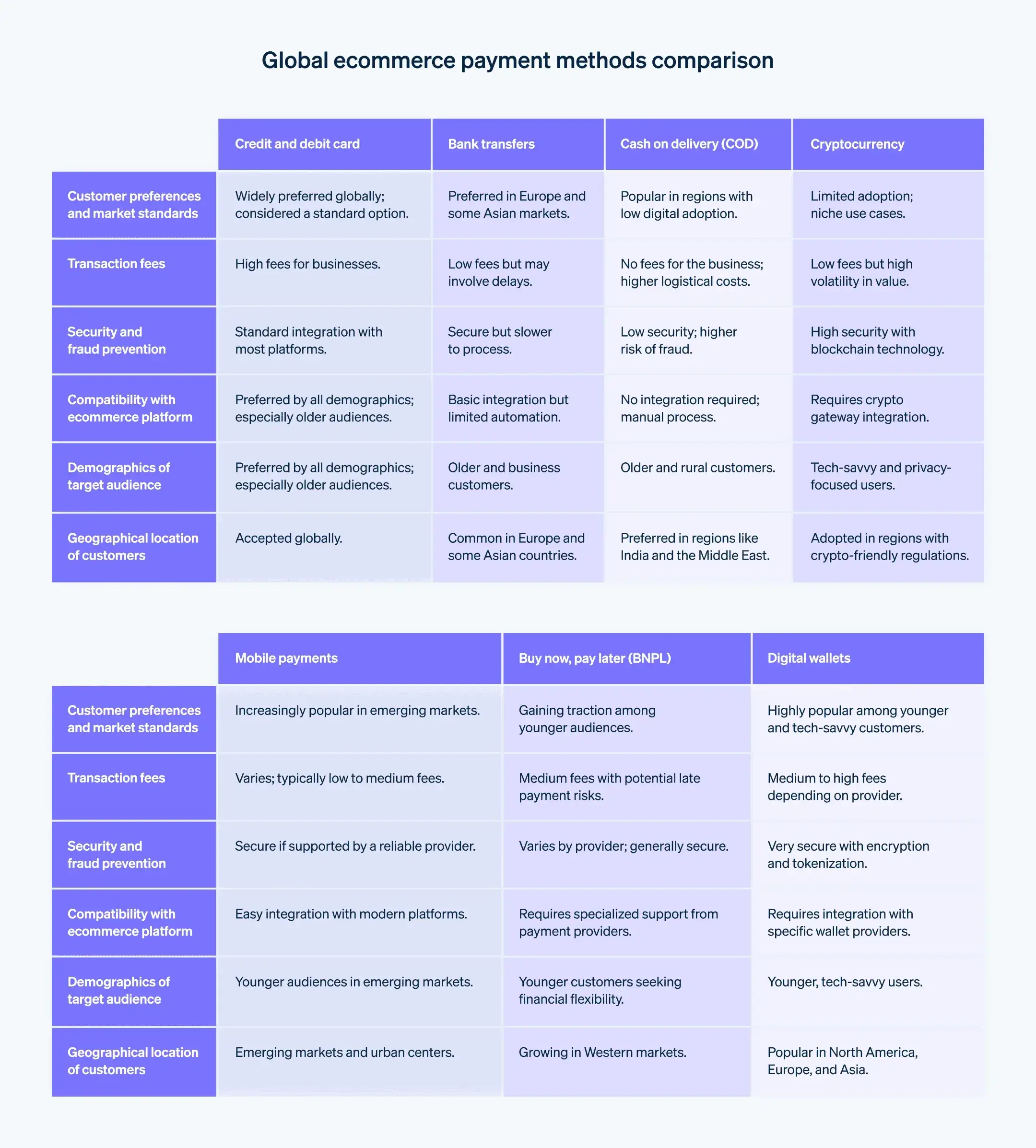
Must-Have Payment Options:
- Credit/debit cards
- PayPal
- Apple Pay / Google Pay
- Buy Now, Pay Later (Klarna, Afterpay)
Ensure your platform is PCI-compliant and offers SSL encryption.
Want to stay ahead with the latest payment trends that can boost your sales and customer trust? Check out our blog on eCommerce payment trends you can’t ignore here!
Source - stripe
Step 7: Configure Shipping and Tax
Transparency is key. Nobody likes surprise fees.
Key Steps:
- Define your shipping zones and rates
- Offer free shipping if possible (it boosts conversion!)
- Automate tax calculations based on location
Step 8: Optimize for SEO
Want to rank on Google and get free traffic? Then SEO is non-negotiable.
Basics You Need:
- Include phrases like "how to build an ecommerce website" in your page titles and descriptions
- Create unique meta titles and meta descriptions
- Optimize images with alt text
- Add a blog to regularly publish helpful content
Tools to Help:
- Google Search Console
- Diginyze built-in SEO suite
Step 9: Set Up Marketing and Analytics
Build it and they will come? Not quite. You need a solid marketing plan.
Essentials:
- Email Marketing: Set up automated welcome, cart recovery, and promo emails
- Social Media Integration: Connect Instagram, Facebook, Pinterest for direct selling
- Predictive Analytics: Track who visits your site, what they do, and where they drop off
- AI Marketing: Platforms like Diginyze use AI to personalize campaigns and increase ROI
Step 10: Test and Launch!
Before going live, test everything like a customer would.
Your Pre-Launch Checklist:
- Test every button, form, and link
- Complete a test purchase
- Check mobile usability
- Proofread all content
Once you're satisfied, hit publish and officially open your digital doors!
You can also read our detailed guide on How to Set Up an Online Store for a complete walkthrough to help you launch your eStore with confidence!
Step 11: Keep Improving (Post-Launch)
The launch is just the beginning. Keep testing, optimizing, and expanding.
Post-Launch Tips:
- Encourage customer reviews
- Monitor site speed and user experience
- Test different versions of your product pages and checkout
- Expand your product catalog based on demand

Step 12: Build Trust with Your Customers
Trust is the currency of online shopping. No one wants to hand over their credit card details to a site that feels sketchy.
How to Earn Customer Trust:
- Add an About Us page sharing your story
- Include contact information - email, phone, chat
- Use trust badges (SSL, payment partners, shipping guarantees)
- Show real reviews and testimonials
- Create clear return/refund policies
To reassure your customers even more, learn how Diginyze’s eCommerce security protects your data, server and keeps your store secure.
Bonus Tip:
Add a FAQ section to answer the most common questions shoppers might have. This can include things like shipping times, return policies, how to contact support, sizing guides, and more. It reduces customer service inquiries and boosts buyer confidence. Make it easy to find by adding links in your main menu and bottom of the page. Remember if someone has a question and can’t find the answer quickly, they might just leave your site altogether.
Step 13: Create a Memorable Brand Identity
Branding isn’t just your logo it’s how people feel when they visit your site.
Focus On:
- Logo and Color Scheme: Keep it consistent
- Voice and Tone: Are you fun and quirky or professional and sleek?
- Photography Style: Bright and playful or minimal and elegant?
- Packaging: If applicable, add delight with custom packaging that surprises your customer
A strong brand can help you stand out and keep customers coming back again and again. Think about brands you love: they make you feel something. That emotional connection is what drives loyalty.
And guess what? Your small business can do that too. Whether it's your tone of voice, your packaging, or even those thank-you emails, every touchpoint is a chance to build a lasting relationship with your customer.
So don’t just aim for a good-looking website. Aim for a brand experience that makes people say, “I love shopping here.”
Step 14: Ensure Legal and Compliance Essentials Are in Place
This part may not be fun, but it’s really important.
Don’t Skip These:
- Business Licenses and Permits: Make sure you're legally allowed to sell online in your country or state.
- Terms & Conditions:Clearly outline your policies on payments, returns, shipping, and user behavior.
- Privacy Policy: Inform customers how their data is collected, stored, and used (especially important for GDPR or CCPA).
- Cookie Consent : Add a pop-up if your site uses tracking or analytics tools.
- PCI Compliance : Use secure payment gateways to handle credit card transactions safely.
Handling this upfront helps avoid legal headaches down the road and builds trust with your customers.
Benefits of having an eCommerce Website
Starting an eCommerce website opens the door to countless advantages that traditional stores can’t match. Here are some of the top benefits:
1. Reach a Global Audience
Unlike a physical store limited by location, your online store is accessible to customers around the world 24/7 expanding your market far beyond local boundaries.
2. Lower Costs
No need for expensive rent or large staffs. Running an eCommerce site often costs less to start and maintain than a brick-and-mortar store.
3. Convenience for Customers
Shoppers can browse and buy products anytime, anywhere, using any device which means more sales opportunities and happier customers.
4. Personalized Shopping Experience
With AI-powered eCommerce platform like Diginyze, you can offer personalized product recommendations, discounts, and marketing tailored to each visitor’s behavior.
5. Scalability
As your business grows, your eCommerce platform can easily scale with it handling more products, more customers, and more sales without a major overhaul.
6. Valuable Customer Insights
Track buying patterns, website behavior, and product popularity with analytics to make smarter business decisions and improve your offerings.
7. Automation and Efficiency
Automate tasks like inventory management, order processing, and marketing campaigns saving you time and reducing errors.
8. Competitive Advantage
A professional eCommerce website helps establish your brand online, build credibility, and stay competitive in an increasingly digital market.
Final Thoughts: Start Smart. Grow Bold.
Building an online store is now simpler and cheaper than ever before. With smart tools, AI-powered platforms like Diginyze, and a clear step-by-step plan, you can create a site that not only looks good but sells effectively.
Talk to Diginyze eCommerce experts today and take your first step toward building a powerful online business.
FAQs
1. What is the easiest way to build an eCommerce website?
Platforms like Diginyze AI-driven eCommerce platform make it simple with drag-and-drop tools and pre-built templates.
2. Do I need to know how to code to make eCommerce website?
Nope! Most eCommerce platforms are no-code and beginner-friendly like Diginyze.
3. What’s the best platform for small businesses?
Diginyze are great for small to mid-sized businesses due to their ease of use and scalability.
4. How long does it take to launch an eCommerce store?
Anywhere from a few hours to a few weeks, depending on complexity and content readiness.
5. What payment methods should I accept for my eCommerce store?
Accept payments like credit/debit cards, PayPal, Apple Pay, Google Pay, and buy now, pay later services.
6. Is it important to have a mobile-friendly eCommerce site?
Absolutely! Over 60% of people shop online using their phones.
7. How do I get traffic to my online store?
Use SEO, social media marketing, email campaigns, and paid ads to drive traffic.
8. How can I make my eCommerce website secure?
Use SSL certificates, choose a PCI-compliant platform, and display trust badges.
9. What legal pages do I need to have in my eCommerce website?
You should include a Privacy Policy, Terms & Conditions, and Return Policy.
10. Do I need a business license to sell online?
Yes, most U.S. states require a business license and a seller’s permit.
11. Can I sell products without holding inventory?
Yes! You can use dropshipping or print-on-demand services.
12. How should I handle shipping for my online store?
You can choose to ship items yourself, partner with third-party logistics providers (3PL), or use dropshipping where suppliers handle fulfillment directly.
13. What are the biggest mistakes to avoid when making eCommerce site?
Not researching your market, poor product photos, unclear policies, and ignoring SEO.
14. How important are product photos?
Very! Clear, high-quality images can dramatically boost sales.
15. How do I choose the right products to sell?
Start with what you're passionate about or knowledgeable in. Use tools like Google Trends, Etsy, and Amazon Best Sellers to find trending and profitable products.
Recent Blogs
The latest insight into technology and Ecommerce
AI Chatbot for eCommerce: The 24/7 Strategy to Drive 70%+ Conversions and Scale
Did you know? 71% of Gen Z customers buy items via chatbots and 40% of customers use retail digital assistants.
KNOW MORE
AI for Small Retailers: How to Thrive in the E-Retail Revolution
Did you know that U.S. eCommerce sales are expected to hit a record $1.192 trillion in this year, up from $571 billion in 2019?
KNOW MORE
AI-Powered vs. Traditional eCommerce Website Builder: Don’t Get Left Behind!
Choosing the right eCommerce Website Builder is crucial for any eCommerce business.
KNOW MORE
Why Top U.S. Enterprises Are Ditching Legacy eCommerce for AI-First Platforms Like Diginyze
Did you know that U.S. eCommerce sales crossed $1.1 trillion in 2024, yet over 64% of enterprise brands say .....
KNOW MORE
How AI Personalization is Driving a 25% Sales Surge
Did you know? AI-powered search functionalities can increase eCommerce conversion rates by up to 43%, significantly enhancing the efficiency of online shopping platforms. In today's fast-paced eCommerce world, time is of the essence. Customers are no longer willing to sift through endless pages of products just to find what they’re looking for.
KNOW MORE
AI Overviews are Killing Your Traffic: What to do in 2026 and Beyond
Google’s AI Overviews are reshaping search visibility in 2026, causing traffic drops across eCommerce.
KNOW MORE

Advanced AI Security for your Online Store by Diginyze
Cyber Security for eCommerce
Diginyze: Discover the Future of eCommerce Analytics
Diginyze eCommerce Analytics
AI-Driven eCommerce Marketing with Diginyze
eCommerce
Diginyze's AI Search for eCommerce Store
AI in eCommerce
Diginyze's AI-Powered Intelligent eCommerce Platform
AI-Powered eCommerceDiginyze's AI-Native eCommerce for B2B, B2C & Marketplaces
AI-Native eCommerceCase Studies




Your Digital Transformation Starts Here!
Join thousands of businesses transforming with Diginyze. Sign up today and start now!